Sunday, February 20, 2011
This blog is continued elsewhere
I decided to concentrate my blogs and have categories for specialist blogs like this one. You can continue about my chemical RCP adventure here.

Thursday, June 17, 2010
A StackExchange about developing Eclipse RCP applications?
Dear Eclipse Community,
I know there is a tremendous amount of information online, and StackOverflow full of Eclipse-RCP questions already. But the downside of that is that there is a lot of noise. Would it be an idea to set up a StackExchange dedicated to development of Eclipse RCP-based applications?
If you like the idea, please contribute to the Definition process. And if you don't, you're more than welcome to express that too :)
I know there is a tremendous amount of information online, and StackOverflow full of Eclipse-RCP questions already. But the downside of that is that there is a lot of noise. Would it be an idea to set up a StackExchange dedicated to development of Eclipse RCP-based applications?
If you like the idea, please contribute to the Definition process. And if you don't, you're more than welcome to express that too :)
Monday, May 10, 2010
How to use GitHub for [CDK|Bioclipse] code review
Triggered by posts in the past three days, I though about writing up a short tutorial on how to perform code review for existing code on GitHub. Therefore, this applied to CDK and Bioclipse source code, many but will work for any project hosted in GitHub. Even if it is not, you could consider putting up a copy there yourself. This example will demonstrate the procedure on CDK functionality in Bioclipse in the bioclipse.cheminformatics repository.
Click on the images to get a higher resolution version.
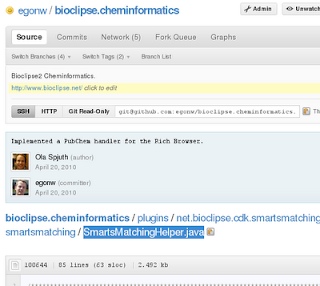
Step 1: find the class you want to review
Use the GitHub web interface to browse your way towards the source code of the class you want to review. For example, the SmartsMatchingHelper.java:
Step 2: identify something you like to comment on
Next step is to perform some code reviewing. For example, we might want to ask something about how parseProperty() works:
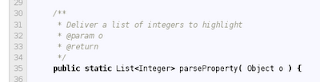 Now, this page on GitHub does not provide the means to leave comments; instead, you comment on commits.
Step 3: find the last commit that touched the line you like to comment on
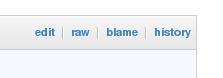
Git has a blame option (also called annotate) which will show you for each line who last changed that line. The GitHub web page makes this functionality available with the 'blame' link just above the first line of the source code:
 This link will lead us to a page with a new column on the left side showing commit hashes, name of the commit author, and the first few characters of the commit message. For example, the web page bits relevant to code we want to comment on, looks like:
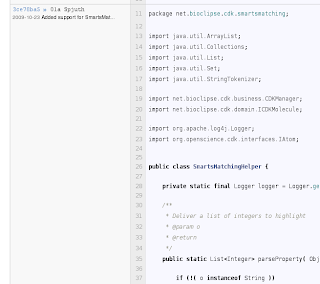 This shows us that commit 3ce78ba5 is the one we are interested in:
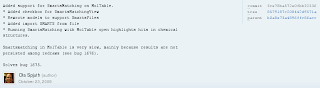
Step 4: Look up the line again and add a comment
In the web page with the appropriate commit looked in the previous step, you scroll down to the line you want to comment on. If you hover over that line, a blue comment bubble will show up on the left side:
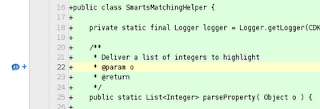 Clicking that blue comment icon, you get a dialog where you can enter your comment:
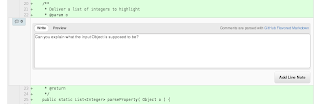 The 'Add Line Note' button confirms and saves your comment:
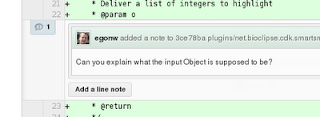
Step 5: inform the commiter about your review
The next step would be to inform the commit author. GitHub actually helps here, and should send a message, like this one:
 But it would certainly not hurt of you filed a bug report or sent an email.
Now, I should only convert this into a screencast...
Click on the images to get a higher resolution version.
Step 1: find the class you want to review
Use the GitHub web interface to browse your way towards the source code of the class you want to review. For example, the SmartsMatchingHelper.java:

Step 2: identify something you like to comment on
Next step is to perform some code reviewing. For example, we might want to ask something about how parseProperty() works:
 Now, this page on GitHub does not provide the means to leave comments; instead, you comment on commits.
Step 3: find the last commit that touched the line you like to comment on
Git has a blame option (also called annotate) which will show you for each line who last changed that line. The GitHub web page makes this functionality available with the 'blame' link just above the first line of the source code:
 This link will lead us to a page with a new column on the left side showing commit hashes, name of the commit author, and the first few characters of the commit message. For example, the web page bits relevant to code we want to comment on, looks like:
 This shows us that commit 3ce78ba5 is the one we are interested in:
Step 4: Look up the line again and add a comment
In the web page with the appropriate commit looked in the previous step, you scroll down to the line you want to comment on. If you hover over that line, a blue comment bubble will show up on the left side:
 Clicking that blue comment icon, you get a dialog where you can enter your comment:
 The 'Add Line Note' button confirms and saves your comment:
Step 5: inform the commiter about your review
The next step would be to inform the commit author. GitHub actually helps here, and should send a message, like this one:
 But it would certainly not hurt of you filed a bug report or sent an email.
Now, I should only convert this into a screencast...
Thursday, March 25, 2010
A GSoC project idea around the Resource Description Framework
I just added an entry to the Google Summer of Code 2010 Ideas wiki page:
- Resource Description Framework (RDF) is ~10 year old W3C standard. Uptake is taking off now, and it would be nice to see a Eclipse project like the Web Tools Package to provide basic RDF related functionality. This would include bundles for RDF libraries (Jena or OpenSesame) and editors for Notation3 and RDF/XML, and perhaps support for a catalog of common ontologies (RDF, RDFS, OWL, DublinCore, FOAF, ...). It could also include a Zest-based RDF graph viewer, SPARQL query editor, etc. There is existing code, for example, developed by the Bioclipse team using Jena, or the older Tripclipse. There also exist commercial offerings stressing the relevance of the RDF platform, such as Semantic Toolkit and the popular TopBraid.
Tuesday, March 16, 2010
IFile.getContentDescription() returns null on files from the workbench. Advice?
When Bioclipse reads filed its workspace, it used IFile.getContentDescription() in version 2.0 and 2.2. However, I now note that unit tests that use this method fail where they used to work in earlier versions. Instead of returning something, I get a null. An example unit test looks like:
The JavaDoc lists this methods as more efficient alternative:
As it used to work, I am considering the option it is a bug. But at the same time, maybe best practices have change? Should I keep using this method, explore the cause, perhaps file a bug report, or start using getDescriptionFor(getContents(), getName(), IContentDescription.ALL)?
  propane = cdk.loadMolecule(path);
  Assert.assertNotNull(propane.getResource());
  Assert.assertTrue(propane.getResource() instanceof IFile);
  IFile resource = (IFile)propane.getResource();
  Assert.assertNotNull(resource.getContentDescription());
  IContentType type = resource.getContentDescription().getContentType();
  Assert.assertNotNull(type);
  IChemFormat format = cdk.determineFormat(type);
  Assert.assertNotNull(format);
  Assert.assertEquals(MDLV2000Format.getInstance(), format);
This test uses the getContentDescription() to get a content description and converts it to a CDK library specific format type.
The JavaDoc lists this methods as more efficient alternative:
- Calling this method produces a similar effect as calling getDescriptionFor(getContents(), getName(), IContentDescription.ALL) on IContentTypeManager, but provides better opportunities for improved performance.
As it used to work, I am considering the option it is a bug. But at the same time, maybe best practices have change? Should I keep using this method, explore the cause, perhaps file a bug report, or start using getDescriptionFor(getContents(), getName(), IContentDescription.ALL)?
Monday, March 15, 2010
RDF-powered QSAR wizard: SPARQL end points providing wizard content
As you know from my blog, one of the things I am working on is to push RDF functionality in Bioclipse, as I believe it to be the missing link between molecular chemometrics and literature, databases, and other non-numerical information sources.
As part of the submission for the SWAT4LS special issue in the new Journal of Biomedical Semantics, Ola hacked up a cool wizard that sets up a new QSAR Project by downloading data directly from our RDF node for the chEMBL data using SPARQL. The paper is based on the SWAT4LS talk I gave, and the proceedings paper that recently appeared. But with more cool stuff, such as this cool RDF graph browser that allows you to open up molecules from the RDF graph in a JChemPaint editor.
Well, this really nice New QSAR Project wizard was cool enough to trigger a I-want-more reaction, so I just had to hack it up with some additional SPARQL functionality. So, the next version does not only use RDF and SPARQL to aggregate the QSAR data set, it also uses SPARQL to make the wizard interactive. While the user is typing a target ID, the wizard will check the SPARQL end point in the background and download the target's type, title and organism, as well as update the list of activities the user can select depending on what the chEMBL database has for that target:
 The actual code base is pretty small, and that's what happens when you mash up the right technologies :)
As part of the submission for the SWAT4LS special issue in the new Journal of Biomedical Semantics, Ola hacked up a cool wizard that sets up a new QSAR Project by downloading data directly from our RDF node for the chEMBL data using SPARQL. The paper is based on the SWAT4LS talk I gave, and the proceedings paper that recently appeared. But with more cool stuff, such as this cool RDF graph browser that allows you to open up molecules from the RDF graph in a JChemPaint editor.
Well, this really nice New QSAR Project wizard was cool enough to trigger a I-want-more reaction, so I just had to hack it up with some additional SPARQL functionality. So, the next version does not only use RDF and SPARQL to aggregate the QSAR data set, it also uses SPARQL to make the wizard interactive. While the user is typing a target ID, the wizard will check the SPARQL end point in the background and download the target's type, title and organism, as well as update the list of activities the user can select depending on what the chEMBL database has for that target:

Thursday, March 4, 2010
RDF, Jena, Bioclipse, Eclipse, Zest #2: icons and an extension point
Jonathan worked this week on new features for the Bioclipse RDF editor (see these two earlier items). This version still does not edit, but only display using Zest. Jonathan created for me an extension point so that anyone can make the editor aware of domain objects, by simply registering the extension implementation along with the rdf:Class URI of the rdf:type of an object. This fixes the problem of having to hardcode dependencies of the RDF editor on all the domain code, as was the case earlier.
For example, the cheminformatics IMolecule object is now linked to the rdf:type <http://www.bioclipse.net/structuredb/#Molecule>:
 For example, double clicking the ron:mol2 node, would open up a JChemPaint editor.
For example, the cheminformatics IMolecule object is now linked to the rdf:type <http://www.bioclipse.net/structuredb/#Molecule>:
<extension point="net.bioclipse.rdf.rdf2bioobjectfactory">
  <Factory
    instance="net.bioclipse.rdf.ui.RDFToCDKMoleculeFactory"
    uri="http://www.bioclipse.net/structuredb/#Molecule" >
  </Factory>
</extension>
The API for this factory looks like:public IBioObject rdfToBioObject( Model model, Resource res ); public ImageDescriptor getImageDescriptor();This is very much tied into the Jena data model, so not entirely clean, but has to do for now. The first method converts RDF content into a Bioclipse IBioObject, such as an IMolecule (see this list of currently supported objects). The second method returns an icon, which makes the editor more visually pleasing, and provides a nice way to see when you can double click the RDF node to have it open in an domain specific editor:

Sunday, February 7, 2010
RDF, Jena, Bioclipse, Eclipse, Zest: Mashups
Quite a while a go, I blogged about Zest in Bioclipse showing a bit of ONS Solubility data. I could not follow up on that until now, as I had yet to do a lot of RDF work in Bioclipse, so the screenshot back then was kind of a mockup.
Things are different now, and the Bioclipse-RDF functionality (using Jena) is released in Bioclipse 2.2 (see Semantic Web features in Bioclipse 2.2), and I got around to writing the graphical goodies for the following papers. Not submitted yet, but here's the screenshot showing a N3 file opened with a Zest-powered editor (read-only) and a plain text editor:

Things are different now, and the Bioclipse-RDF functionality (using Jena) is released in Bioclipse 2.2 (see Semantic Web features in Bioclipse 2.2), and I got around to writing the graphical goodies for the following papers. Not submitted yet, but here's the screenshot showing a N3 file opened with a Zest-powered editor (read-only) and a plain text editor:

Wednesday, February 3, 2010
Semantic Web features in Bioclipse 2.2
Ola is releasing Bioclipse 2.2.0 today, and asked me to show case the semantic web functionality in Bioclipse. I realized that I do not have a nice page showing the semantic web overview. But I did blog a lot about RDF functionality, so here's a list of pointers:

One thing I have not blogged about yet (I think), is that the Bioclipse RDF manager also understands RDFa now. Well, sort of... it relies on a webservice, but this is what the script looks like:
- Bioclipse Manager for MyExperiment.org
- Bioclipse, RDF and defeasible reasoning (see also Samuel's blog)
- Bioclipse and SPARQL end points #2: MyExperiment
- Bioclipse and SPARQL end points
- Solubility Data in Bioclipse #2: handling RDF
- Solubility Data in Bioclipse #3: Finding ChEBI IDs
- Solubility Data in Bioclipse #4: Finding ChEBI IDs (Again, but better)
- /me is having Bioclipse/XMPP/RDF fun

One thing I have not blogged about yet (I think), is that the Bioclipse RDF manager also understands RDFa now. Well, sort of... it relies on a webservice, but this is what the script looks like:
model = rdf.createStore()
rdf.importRDFa(model, "http://egonw.github.com/")
rdf.saveRDFN3(model, "/Virtual/egonw.n3")
With support of SPARQL end points, and reading RDF from web resources directly (RDF/XML, N3, RDFa), Bioclipse is ready for the chemical semantic web.
Monday, February 1, 2010
Validating MDL SD files and Symyx molfiles with the CDK
Bioclipse 2.0 introduced a new, powerful molecular table support, and we have been eager to test that on large SD files. A recent ChEBI SD file failed to open, and eyes were immediately at the CDK, which is the cheminformatics library used in Bioclipse.
After careful investigations, it turned out that the ChEBI file contained a few entries which were not MDL molfiles, but queries for the ISISBase system. Those cannot be read by the CDK MDLV2000Reader. However, it crashed on it, instead of failing more savely. That's not nice, and fixed. But, the problem is rather recurrent, and the reason why I like CML so much: invalid input. CML, based on XML, has several general validation approaches that give in-depth error messages of what is wrong with the file.
So, I asked on the BOx what the Open Source cheminformatics community had to offer for this. Turns out that several tools find problems in the files, but none could report where the error occurred.
Validation
Now, some time ago, I played with two reading modes, RELAXED and STRICT, as faulty files is core cheminformatics material, and the software is blamed if the QSAR model resulting from it is not good (seriously). Anyways, a small API change in the CDK would make a validating MDLV2000Reader quite a step closer, but I had not followed up on it until last Friday where I patch I was reviewing caused 6 new unit test fails. The new fails were caused by a assumption which turned out the be false in the test files used in those 6 unit tests.
The MDL (or Symyx) molfile specifications (not an Open Specification) defines an atom block line as:
Now, personally, I rather send the file back to the user with a proper error report and show them what is wrong with the file. Or better, provide them with a MDL V2000 text editor (e.g. in Bioclipse) which would graphically highlight errors, as many of us are used to with Eclipse:

CDK Patch
So, I am hacking up a patch for CDK master to allow error reporting by IChemObjectReaders. The initial version of the API update and use in the MDLV2000Reader are available as Gist 290659. They are not final yet, as I realized when making the above screenshot, that merely int col is not enough, and that I actually need the startCol and endCol positions instead. Also, there are only an error level at this moment, and no warning level as in the screenshot.
That said, I created a jar (ant dist-large) and saved it as mdlCheck.jar, and wrote a bit of Groovy:
which defines a class implementing the new IChemObjectReaderErrorHandler and then reads a MDL molfile. And the output looks like it fulfills my needs:
Or, another common found issue (using D and T as element symbols):
Enough for now... dinner time.
After careful investigations, it turned out that the ChEBI file contained a few entries which were not MDL molfiles, but queries for the ISISBase system. Those cannot be read by the CDK MDLV2000Reader. However, it crashed on it, instead of failing more savely. That's not nice, and fixed. But, the problem is rather recurrent, and the reason why I like CML so much: invalid input. CML, based on XML, has several general validation approaches that give in-depth error messages of what is wrong with the file.
So, I asked on the BOx what the Open Source cheminformatics community had to offer for this. Turns out that several tools find problems in the files, but none could report where the error occurred.
Validation
Now, some time ago, I played with two reading modes, RELAXED and STRICT, as faulty files is core cheminformatics material, and the software is blamed if the QSAR model resulting from it is not good (seriously). Anyways, a small API change in the CDK would make a validating MDLV2000Reader quite a step closer, but I had not followed up on it until last Friday where I patch I was reviewing caused 6 new unit test fails. The new fails were caused by a assumption which turned out the be false in the test files used in those 6 unit tests.
The MDL (or Symyx) molfile specifications (not an Open Specification) defines an atom block line as:
xxxxx.xxxxyyyyy.yyyyzzzzz.zzzz aaaddcccssshhhbbbvvvHHHrrriiimmmnnneeebut does not specify which fields are optional. And indeed, many tools around save MDL molfiles with one or more fields missing, leading to shorter than expected line lengths. And, as you might have expected, the failing unit tests had files with lines missing the field introduced by the patch, causing Exceptions being thrown around. I have yet to make up my mind of the lack of those fields is a problem in the file, or allowed by the format. In either case, the information from that field is not available, and the reader could safely ignore the missing information. Per user demand.
Now, personally, I rather send the file back to the user with a proper error report and show them what is wrong with the file. Or better, provide them with a MDL V2000 text editor (e.g. in Bioclipse) which would graphically highlight errors, as many of us are used to with Eclipse:

CDK Patch
So, I am hacking up a patch for CDK master to allow error reporting by IChemObjectReaders. The initial version of the API update and use in the MDLV2000Reader are available as Gist 290659. They are not final yet, as I realized when making the above screenshot, that merely int col is not enough, and that I actually need the startCol and endCol positions instead. Also, there are only an error level at this moment, and no warning level as in the screenshot.
That said, I created a jar (ant dist-large) and saved it as mdlCheck.jar, and wrote a bit of Groovy:
which defines a class implementing the new IChemObjectReaderErrorHandler and then reads a MDL molfile. And the output looks like it fulfills my needs:
$ CLASSPATH=mdlCheck.jar groovy mdlCheck.groovy src/test/data/mdl/test6.sdf
location: 5, 35: Could not parse mass difference field.
  -> For input string: ""
location: 6, 35: Could not parse mass difference field.
  -> For input string: ""
Note to myself, that atom block does not like like a MDL molfile atom block at all! Every second line outputs the Exception passed to the error handler. I have to say, those messages are rather cryptic, but resulting from a NumberFormatException, if not mistaken.
Or, another common found issue (using D and T as element symbols):
$ CLASSPATH=mdlCheck.jar groovy mdlCheck.groovy src/test/data/mdl/hisotopes.mol
location: 6, 32: Invalid element type. Must be an existing element, or one in: A, Q, L, LP, *.
location: 7, 32: Invalid element type. Must be an existing element, or one in: A, Q, L, LP, *.
Enough for now... dinner time.
Wednesday, December 16, 2009
Target Platform to have $HOME/.eclipse/$ECLIPSE/plugins ??
Bioclipse uses a custom target-platform... but since I am using the Eclipse 3.5 from Ubuntu now, extra features I download (GEF, BIRT, EMF, ...) end up in $HOME... so, I need to add a folder to the target-platform.target file... but I cannot find the variable for $HOME/.eclipse/org.eclipse.platform_3_foo_bar/plugins, such the files has things like @{eclipse_home}/plugins too...
Right now I have the below, but that clearly is not the solution:
What is the @{variable} I should use for user-based plugin folders?
Right now I have the below, but that clearly is not the solution:
<?xml version="1.0" encoding="UTF-8" standalone="no"?>
<?pde version="3.5"?>

<target name="Spring-osgi-1.0.2">
  <locations>
    <location path="${eclipse_home}" type="Profile"/>
    <location path="${project_loc}/spring-osgi-1.0.2/dist" type="Directory"/>
    <location path="${project_loc}/libs" type="Directory"/>
    <location path="${project_loc}/spring-osgi-1.0.2/lib" type="Directory"/>
    <location path="${eclipse_home}/plugins" type="Directory"/>
    <location path="/home/egonw/.eclipse/org.eclipse.platform_3.5.0_155965261/plugins"
                 type="Directory"/>
  </locations>
</target>
What is the @{variable} I should use for user-based plugin folders?
Saturday, November 7, 2009
Call for Collaboration: JavaDoc validation with OpenJavaDocCheck
Dear all,
while it is still very much in progress, I have made good progress with writing a new BSD-licensed replacement for Sun's DocCheck utility for testing the library's JavaDoc quality. The DocCheck's never really satisfied me, and the most recent version is ancient. Because it is closed source, no one can continue on those efforts. DocCheck is MIA.
PMD is given nice, simple overviews instead. It provides me with a quick overview of what is wrong with the CDK JavaDoc, and also provides a decent XML format which allows extraction of information, which is used by, for example, SuperNightly as showed yesterday in PMD 2.4.5 installed in the CDK 1.2.x branch.
I have been pondering about it for a long time now, but writing a JavaDoc checking library is hardly core cheminformatics research; at least, you would not get funding for it, despite everyone always complaining about good documentation. Alas.
A few weeks ago, I was reviewing some more code, and again saw the very common error of the missing period at the end of the first sentence in JavaDoc. This one is sort of important for proper JavaDoc documentation generation, but the complexity of the current DocCheck reporting, people are not familiar enough with it. Being tired of having to repeat myself, I decided to address the problen, but creating better Nightly error reporting for the CDK JavaDoc.
So, I started OpenJavaDocCheck, or ojdcheck. As mentioned, I have made quite promising progress, and the current version provides the ability to write custom tests (which I plan to use for validating content of CDK taglet content), and create XML as well as XHTML which can be saved to any file. To give you a glimps of where things are going, here's a screenshot of the current XHTML output:

This list shows a mix of tests that are now implemented in OpenJavaDocCheck itself, but the third line is actually a test that is plugged in and specific for the CDK. This is an important feature, I think, and allows users of OpenJavaDocCheck to add functionality is that is not interesting to the general public, but very interesting for the JavaDoc being analyzed. Well, at least, it is to the CDK project :)
The current list of tests is still quite small, and consists of these tests:
while it is still very much in progress, I have made good progress with writing a new BSD-licensed replacement for Sun's DocCheck utility for testing the library's JavaDoc quality. The DocCheck's never really satisfied me, and the most recent version is ancient. Because it is closed source, no one can continue on those efforts. DocCheck is MIA.
PMD is given nice, simple overviews instead. It provides me with a quick overview of what is wrong with the CDK JavaDoc, and also provides a decent XML format which allows extraction of information, which is used by, for example, SuperNightly as showed yesterday in PMD 2.4.5 installed in the CDK 1.2.x branch.
I have been pondering about it for a long time now, but writing a JavaDoc checking library is hardly core cheminformatics research; at least, you would not get funding for it, despite everyone always complaining about good documentation. Alas.
A few weeks ago, I was reviewing some more code, and again saw the very common error of the missing period at the end of the first sentence in JavaDoc. This one is sort of important for proper JavaDoc documentation generation, but the complexity of the current DocCheck reporting, people are not familiar enough with it. Being tired of having to repeat myself, I decided to address the problen, but creating better Nightly error reporting for the CDK JavaDoc.
So, I started OpenJavaDocCheck, or ojdcheck. As mentioned, I have made quite promising progress, and the current version provides the ability to write custom tests (which I plan to use for validating content of CDK taglet content), and create XML as well as XHTML which can be saved to any file. To give you a glimps of where things are going, here's a screenshot of the current XHTML output:

This list shows a mix of tests that are now implemented in OpenJavaDocCheck itself, but the third line is actually a test that is plugged in and specific for the CDK. This is an important feature, I think, and allows users of OpenJavaDocCheck to add functionality is that is not interesting to the general public, but very interesting for the JavaDoc being analyzed. Well, at least, it is to the CDK project :)
The current list of tests is still quite small, and consists of these tests:
- test if each class and method has JavaDoc
- test for missing @return tags
- test for missing @param tags
- test for @returns instead of @return
- test @param template code, such as added by IDEs like Eclipse
- test @exception template code, such as added by IDEs like Eclipse
- test for redundant @version tags
- spell checking JavaDoc
- checking for 404s of web pages linked with <a href> in the JavaDoc
- well-formedness of the HTML in the webpages
- a PMD-like system to allow people to choose which testing they want or not
- an Eclipse plugin
Wednesday, November 4, 2009
New Bioclipse Features: Kabsch Alignment, RMSD Distance and Tanimoto Simarlity Matrices
We recently submitted a second paper on Bioclipse, and have worked hard in the past two weeks on addressing the reviewers' questions (and we love these feature requests! See also these two blogs). One reviewer seemed very interested in seeing docking available in Bioclipse. While we do not have a full docking feature set up for Bioclipse, we do have functionality to deal with 3D structures, though our researched urged us to focus on the 2D side of cheminformatics so far.
To strengthen our intentions towards the 3D cheminformatics world, we have implemented a few new features, using CDK functionality. For example, we added Kabsch aligment and the related RMSD between molecular structures implemented as both popup menus as well as manager methods. The manager method you can see in action in MyExperiment workflow 937, which you can download directly into Bioclipse with one simple command (see Bioclipse Manager for MyExperiment.org):
As said, there are two stories to adding this new functionality. Because we want all GUI interaction the user performs to be recordable (Scientist 1: What did you do to get those nice results? Scientist 2: I pushed that button in the that long menu. Scientist 1: What button is that? Scientist 2: Wait, I send you the BSL script with a Google Wave.)
The managers that allow this recording is Bioclipse specific, and also the reason why it would not be trivial to make a general Bioclipse plugin for Eclipse... some Spring magic is used to inject the managers into the JavaScript language. Anyway, the second thing is to add a GUI element, like popup menus. Now, this is a particular area where Eclipse excels. Now, I did have to ask for the details, as I am not using this daily (I'm doing science, not IT), but Ola was kind enough to give me the pointers for it.
The below configuration snippet links the pop up action to Bioclipse Navigator content (you know, where your MDL SD, CML, script and other files show up in Bioclipse). But only if I have selected 3 or more files! And, only if those files are actually some molecular content with 3D coordinates! And Bioclipse inherits this functionality by using the Eclipse platform.

And the alignment results will nicely show up in a Jmol viewer (while it is implemented as an Eclipse editor, it is not yet):

The first screenshot also shows the new pop-up menus for calculating two matrices for 3 or more molecules. One is based on the RMSD of the 3D atomic coordinats of the atoms in the MCSS (BTW, Asad's SMSD work is making its way into the CDK library, and will be available in a later Bioclipse version too.) and will create a distance matrix. The second new pop-up menu used the Tanimoto similarity measure based on CDK fingerprints on the selected chemical graphs. If the Bioclipse Statistics feature is installed, the created CSV files will open up in a matrix editor:

To strengthen our intentions towards the 3D cheminformatics world, we have implemented a few new features, using CDK functionality. For example, we added Kabsch aligment and the related RMSD between molecular structures implemented as both popup menus as well as manager methods. The manager method you can see in action in MyExperiment workflow 937, which you can download directly into Bioclipse with one simple command (see Bioclipse Manager for MyExperiment.org):
var smileses = new Array("CC(C)C", "CCCN", "CCC=O");

var unaligned = cdk.createMoleculeList();
for (i=0; i<smileses.length; i++) {
  mol = cdk.fromSMILES(smileses[i]);
  mol = cdk.generate3dCoordinates(mol)
  unaligned.add(mol);
}

var aligned = cdk.kabsch(unaligned)

jmol.load(aligned.get(0));
for (i=1; i<aligned.size(); i++) {
  jmol.append(aligned.get(i));
}
Now, we do have to update the use of Jmol in Bioclipse, and a big overhaul is scheduled for the 2.4 released in February next year. But you get the idea.As said, there are two stories to adding this new functionality. Because we want all GUI interaction the user performs to be recordable (Scientist 1: What did you do to get those nice results? Scientist 2: I pushed that button in the that long menu. Scientist 1: What button is that? Scientist 2: Wait, I send you the BSL script with a Google Wave.)
The managers that allow this recording is Bioclipse specific, and also the reason why it would not be trivial to make a general Bioclipse plugin for Eclipse... some Spring magic is used to inject the managers into the JavaScript language. Anyway, the second thing is to add a GUI element, like popup menus. Now, this is a particular area where Eclipse excels. Now, I did have to ask for the details, as I am not using this daily (I'm doing science, not IT), but Ola was kind enough to give me the pointers for it.
The below configuration snippet links the pop up action to Bioclipse Navigator content (you know, where your MDL SD, CML, script and other files show up in Bioclipse). But only if I have selected 3 or more files! And, only if those files are actually some molecular content with 3D coordinates! And Bioclipse inherits this functionality by using the Eclipse platform.
<menuContribution
  locationURI="popup:org.eclipse.ui.popup.any?after=additions">
  <command
    commandId="net.bioclipse.cdk.ui.handlers.kabschAlignment"
    label="Perform Kabsch Alignment"
    icon="icons/molecule2D.png">
    <visibleWhen>
      <with variable="selection">
        <count value="(2-"/>
        <iterate operator="and" ifEmpty="false">
          <adapt type="org.eclipse.core.resources.IResource">
            <or>
              <test property="org.eclipse.core.resources.contentTypeId"
                       value="net.bioclipse.contenttypes.cml.singleMolecule3d"/>
              <test property="org.eclipse.core.resources.contentTypeId"
                       value="net.bioclipse.contenttypes.cml.singleMolecule5d"/>
              <test property="org.eclipse.core.resources.contentTypeId"
                       value="net.bioclipse.contenttypes.mdlMolFile3D"/>
            </or>
          </adapt>
        </iterate>
      </with>
    </visibleWhen>
  </command>
</menuContribution>
When Bioclipse is run, this looks like:
And the alignment results will nicely show up in a Jmol viewer (while it is implemented as an Eclipse editor, it is not yet):


Wednesday, September 23, 2009
Extension point for running JUnit tests in a RCP Application instance?
One thing that has been on my wishlist is to be able to run the unit tests we have for Bioclipse from inside a running Bioclipse instance. That is, we have a Bioclipse Test Suite features on the update site, matching the functional features we have there. Each such test suite would run all JUnit tests we have for that feature.
The good thing about this is twofold:
So, my question is, did anyone set up an system like this? And, is there an extension point that allows features to plugin additional JUnit test suites into a larger test suite dynamically?
The good thing about this is twofold:
- users can verify that their installation is working as intended
- the development team can easily run the test suite on foreign systems, without the need to install a fully operational Eclipse with Bioclipse development workspace
So, my question is, did anyone set up an system like this? And, is there an extension point that allows features to plugin additional JUnit test suites into a larger test suite dynamically?
Monday, September 7, 2009
New Plug-in Wizard template: Can I add Import-Package programmatically?
Dear Planet Eclipse readers, please take notice of my problem with adding an Import-Package to the MANIFEST.MF using the Plug-in Wizard templating mechanism. Any suggestions and pointers very much appreciated! I'd really like to remove step 7 from the following tutorial:
Last Friday, the Bioclipse 2.1 development series moved to Eclipse 3.5, so I had to update the Bioclipse SDK too, which we developed earlier.
With a new Eclipse version also comes new screenshots to talk you through the process of setting up a new Bioclipse manager plugin.
Step 1
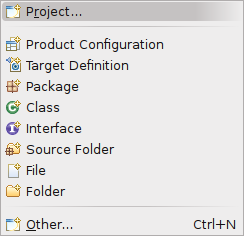
Right click in your workspace navigator, and choose New -> Project:
Step 2
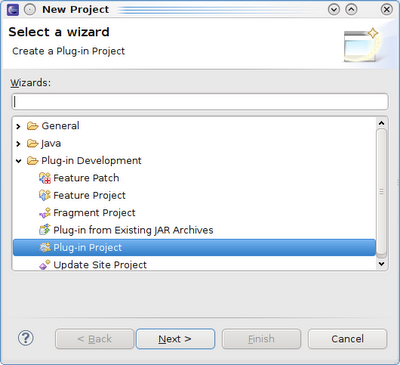
And select to create a new Plug-in Project:
Step 3
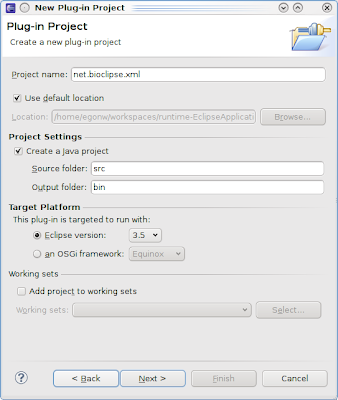
Give a project name, such as net.bioclipse.xml:
Step 4
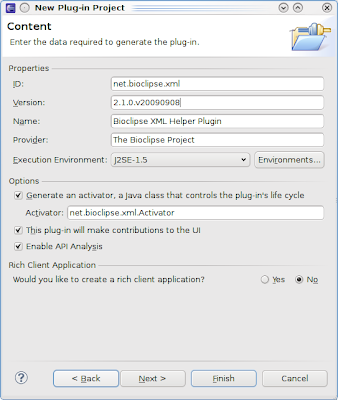
Tune the ID, Version, Name, and Provider to your liking:
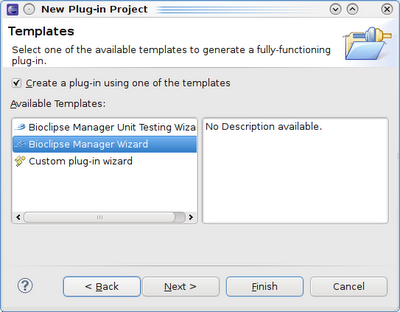
Step 5
Then select Bioclipse Manager:
Step 6
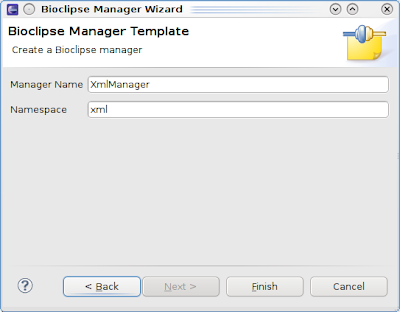
The next wizard page is specific the the Bioclipse manager, and asks a manager namespace, which will be used as prefix in the JavaScript Console. For example, if I make the namespace xml, then I will type xml.someMethod() inside the JavaScript. The default manager name is typically OK by default:
 Then click Finish and let Eclipse set up the new project.
Step 7
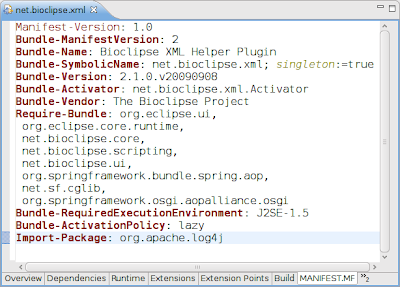
Because I have not figured out yet how to add Import-Package to the MANIFEST.MF programmatically, you will have to do this manually. Add the last line of the next screenshot to the MANIFEST.MF of your new plugin:
Update: I found a hack to add the Import-Package programmatically, by overwriting the execute(IProject project, IPluginModelBase model, IProgressMonitor monitor) in the Template class.
Last Friday, the Bioclipse 2.1 development series moved to Eclipse 3.5, so I had to update the Bioclipse SDK too, which we developed earlier.
With a new Eclipse version also comes new screenshots to talk you through the process of setting up a new Bioclipse manager plugin.
Step 1
Right click in your workspace navigator, and choose New -> Project:

Step 2
And select to create a new Plug-in Project:

Step 3
Give a project name, such as net.bioclipse.xml:

Step 4
Tune the ID, Version, Name, and Provider to your liking:

Step 5
Then select Bioclipse Manager:

Step 6
The next wizard page is specific the the Bioclipse manager, and asks a manager namespace, which will be used as prefix in the JavaScript Console. For example, if I make the namespace xml, then I will type xml.someMethod() inside the JavaScript. The default manager name is typically OK by default:
 Then click Finish and let Eclipse set up the new project.
Step 7
Because I have not figured out yet how to add Import-Package to the MANIFEST.MF programmatically, you will have to do this manually. Add the last line of the next screenshot to the MANIFEST.MF of your new plugin:

Update: I found a hack to add the Import-Package programmatically, by overwriting the execute(IProject project, IPluginModelBase model, IProgressMonitor monitor) in the Template class.
Saturday, August 29, 2009
Reminder: my talk in Frankfurt on Monday; Want to meet up?
Quick and short reminder about my Open Knowledge: Reproducibility in Cheminformatics with Open Data, Open Source and Open Standards talk on Monday. The session is great anyway, with other talks from Cameron, John and someone from Berlin on a Open Access HTS system (which reminds me to talk about the Open Access and that the term is tainted).
I still have a free program, other than I want to see Google Wave in action (and while I have receive my invitation, I have not received a login account yet). There is a potentially interesting talk about Second Generation Small Molecule Therapeutics by 15:00. But no plans otherwise for the afternoon and/or evening.
If you like to talk about CDK, Bioclipse and/or the Blue Obelisk movement. Or about my talk on Open Data, Open Standards and Open Source (ODOSOS) in chemoinformatics.
If you happen to be around the Frankfurt Westend campus. In building 4, I think, the Hörsaalzentrum, where the conference is. Please let me know if you like to meet up. I hope to be online :), but no promise on that... should work at a Uni location, not? Let's see... This is how to ping me, and don't worry about redundancy.
Email: egon.willighagen at gmail dot com
IRC: #cdk at irc.freenode.net
Twitter: egonwillighagen
Identica: chemblaics
Blog: just leave a reply to this message
I still have a free program, other than I want to see Google Wave in action (and while I have receive my invitation, I have not received a login account yet). There is a potentially interesting talk about Second Generation Small Molecule Therapeutics by 15:00. But no plans otherwise for the afternoon and/or evening.
If you like to talk about CDK, Bioclipse and/or the Blue Obelisk movement. Or about my talk on Open Data, Open Standards and Open Source (ODOSOS) in chemoinformatics.
If you happen to be around the Frankfurt Westend campus. In building 4, I think, the Hörsaalzentrum, where the conference is. Please let me know if you like to meet up. I hope to be online :), but no promise on that... should work at a Uni location, not? Let's see... This is how to ping me, and don't worry about redundancy.
Email: egon.willighagen at gmail dot com
IRC: #cdk at irc.freenode.net
Twitter: egonwillighagen
Identica: chemblaics
Blog: just leave a reply to this message
Monday, August 17, 2009
Bioclipse and SPARQL end points
Last week, there was a very interesting thread on the DBPedia mailing list, on using Java for doing remote SPARQL queries. This was one of the features still missing in bioclipse.rdf. Richard Cyganiak replied pointing the code in Jena which conveniently does this and which bioclipse.rdf is already using anyway. Next, Fred Durao even gave a full code example relieving me from any further research, resulting in sparqlRemote() now implemented in the rdf manager:
and
> rdf.sparqlRemote(I reported earlier two example SPARQL queries for chemistry, which can now be rewritten as Bioclipse scripts:
"http://dbpedia.org/sparql",
"select distinct ?Concept where{[] a ?Concept } LIMIT 10"
);
[[http://dbpedia.org/ontology/Place], [http://dbpedia.org/ontology/Area],
[http://dbpedia.org/ontology/City], [http://dbpedia.org/ontology/River],
[http://dbpedia.org/ontology/Road], [http://dbpedia.org/ontology/Lake],
[http://dbpedia.org/ontology/LunarCrater],
[http://dbpedia.org/ontology/ShoppingMall], [http://dbpedia.org/ontology/Park],
[http://dbpedia.org/ontology/SiteOfSpecialScientificInterest]]
and
Thursday, August 13, 2009
Making Bioclipse Development easier: the New Manager Wizard
Today, Jonathan, Carl, Arvid and I made writing managers for Bioclipse a bit easier. Plug-in development Eclipse in itself is already tricky to learn, and the use of Spring by the Bioclipse managers is not helping. And because very soon two new people will be starting with writing a new manager rather soon, we thought it was time to lower the activation barrier a bit.
The basic file structure of an Bioclipse manager looks like:
But we know and understand that setting up this framework is even more challenging if you have not done this at least 10 times before. So, today we implemented a New Wizard (source available from this Git repository: bioclipse.sdk).
 It just asks you a project name:
 and a few other settings:

Installing the Bioclipse SDK
Installing this new plugin is fairly easy, and we have set up an Update Site at http://pele.farmbio.uu.se/sdk/. Just add this as Update site in Eclipse 3.4.x (which is still required for Bioclipse2). It depends on the JDT and PDE, which you will likely already have installed being part of the default Eclipse RCP release.
Go to the Software Updates in the Help menu:
 and pick Add Site.... Enter the aforementioned update site as shown here:
 Then, select the Bioclipse plugin:
 After you hit Install and Eclipse install the fews tens of kBs of the plugin, the plugin should show up in your installation, like it did in mine:

Implementation Details
Writing the plugin was a challenge to me, and I am happy we were doing this in a hackaton. The Bioclipse-QSAR project already had a New Project wizard, but not for a new Plug-in Project. Some things are just slightly different then. For example, it turned out that creating a .classpath cannot be done in the regular way (it never showed up), and I had to dig up some internal code of the PDE. Actually, our current implementation is still using a few internal classes because of this:
I'm sure we'll run in some needed plumbing here and there, but that's what update sites are for, not? Release soon, release often is an Open Source concept that works well in the Eclipse world.
The basic file structure of an Bioclipse manager looks like:
net.bioclipse.foo/That is twelve files which need to be just right. I used to copy/paste from an earlier (simple) manager.
|--META-INF
| |--MANIFEST.MF
| `-- spring
| `-- context.xml
|-- plugin.xml
|-- .classpath
|-- .project
|-- build.properties
`-- src
`-- net
`-- bioclipse
`-- foo
|-- Activator.java
`-- business
|-- FooManager.java
|-- FooManagerFactory.java
|-- IFooManager.java
|-- IJavaFooManager.java
`-- IJavaScriptFooManager.java
But we know and understand that setting up this framework is even more challenging if you have not done this at least 10 times before. So, today we implemented a New Wizard (source available from this Git repository: bioclipse.sdk).
 It just asks you a project name:
 and a few other settings:
Installing the Bioclipse SDK
Installing this new plugin is fairly easy, and we have set up an Update Site at http://pele.farmbio.uu.se/sdk/. Just add this as Update site in Eclipse 3.4.x (which is still required for Bioclipse2). It depends on the JDT and PDE, which you will likely already have installed being part of the default Eclipse RCP release.
Go to the Software Updates in the Help menu:
 and pick Add Site.... Enter the aforementioned update site as shown here:
 Then, select the Bioclipse plugin:
 After you hit Install and Eclipse install the fews tens of kBs of the plugin, the plugin should show up in your installation, like it did in mine:
Implementation Details
Writing the plugin was a challenge to me, and I am happy we were doing this in a hackaton. The Bioclipse-QSAR project already had a New Project wizard, but not for a new Plug-in Project. Some things are just slightly different then. For example, it turned out that creating a .classpath cannot be done in the regular way (it never showed up), and I had to dig up some internal code of the PDE. Actually, our current implementation is still using a few internal classes because of this:
IClasspathEntry[] entries = new IClasspathEntry[3];Ideas are most welcome on how to clean up this code, and not make it use internal, non-exported classes. For the Java source files and even the MANIFEST.MF we are using templates, though I have seen this file being created programmatically too.
String executionEnvironment = null;
ClasspathComputer.setComplianceOptions(
project,
ExecutionEnvironmentAnalyzer.getCompliance(executionEnvironment)
);
entries[0] = ClasspathComputer.createJREEntry(executionEnvironment);
entries[1] = ClasspathComputer.createContainerEntry();
IPath path = project.getProject().getFullPath().append("src/");
entries[2] = JavaCore.newSourceEntry(path);
I'm sure we'll run in some needed plumbing here and there, but that's what update sites are for, not? Release soon, release often is an Open Source concept that works well in the Eclipse world.
Friday, August 7, 2009
Searching PubChem from within Bioclipse
For the application note which we are about to submit, I was working on improving the PubChem Bioclipse API a bit, resulting in new download methods:
The search allows using PubChem Filters which provides many simple means to restrict the search results. For example, we can search molecules and restrict on the molecular weight:
Now, you surely want to look at the hits, for which we use the molecular table editor:

The search allows using PubChem Filters which provides many simple means to restrict the search results. For example, we can search molecules and restrict on the molecular weight:
lists = pubchem.download(pubchem.search("malaria 300:500[MW]")) Other filters you can use in pubchem.search (provided by PubChem itself), includes (with examples):- [el]: pubchem.search("Au[el]")
- [inchi]: pubchem.search("\"InChI=1S/CH4/h1H4\"[inchi]")
- [inchikey]: pubchem.search("VNWKTOKETHGBQD-UHFFFAOYSA-N[inchikey]")
- [mimass]: pubchem.search("375.9785:375.9786[mimass]")
Now, you surely want to look at the hits, for which we use the molecular table editor:
list = pubchem.download(pubchem.search("375.9785:375.9786[mimass]"))
cdk.saveSDFile("/Virtual/hits.sdf", list)
ui.open("/Virtual/hits.sdf")
Resulting in:
Wednesday, August 5, 2009
Running Bioclipse Plugin Unit tests: solving the XPCOM error
Sometimes you can feel so stupid. For example, when the answer is right on front of you, but only after many hours you realize the right question belonging to that answer. For example, take this answer:
 Surely, there are aspects to this which helped me overlook this solution. For example, I had installed Eclipse freshly yesterday, and then the it worked fine. Only after installing some EMF and GEF features, it stopped working again. Bitten by the correlation/causation pattern :(
- add the line: -Dorg.eclipse.swt.browser.XULRunnerPath=/usr/lib/xulrunner
- org.eclipse.swt.SWTError: XPCOM error -2147467262
at org.eclipse.swt.browser.Mozilla.error(Mozilla.java :1638)
at org.eclipse.swt.browser.Mozilla.setText(Mozilla.ja va:1861)
 Surely, there are aspects to this which helped me overlook this solution. For example, I had installed Eclipse freshly yesterday, and then the it worked fine. Only after installing some EMF and GEF features, it stopped working again. Bitten by the correlation/causation pattern :(
Subscribe to:
Posts (Atom)